Fullerton, CA · Orange County · Walk-ins Welcome

PS5 Repair in Fullerton, CA

HDMI Port, Overheating, Liquid Metal, No Power & More

PlayStation 5 repairs handled at our Fullerton shop by trained technicians with micro-soldering and board-level capability. We diagnose the console first, then tell you exactly what is wrong and what it costs before any work starts.

Repairs are managed by OneClick at our Fullerton shop, and we tell you before any specialized partner work.

Have a different console? See our gaming console repair page for Xbox, Nintendo Switch, handhelds and controllers.

Book PS5 RepairCall Now

We do not publish repair prices. A technician confirms your exact price by text and email before any work starts.

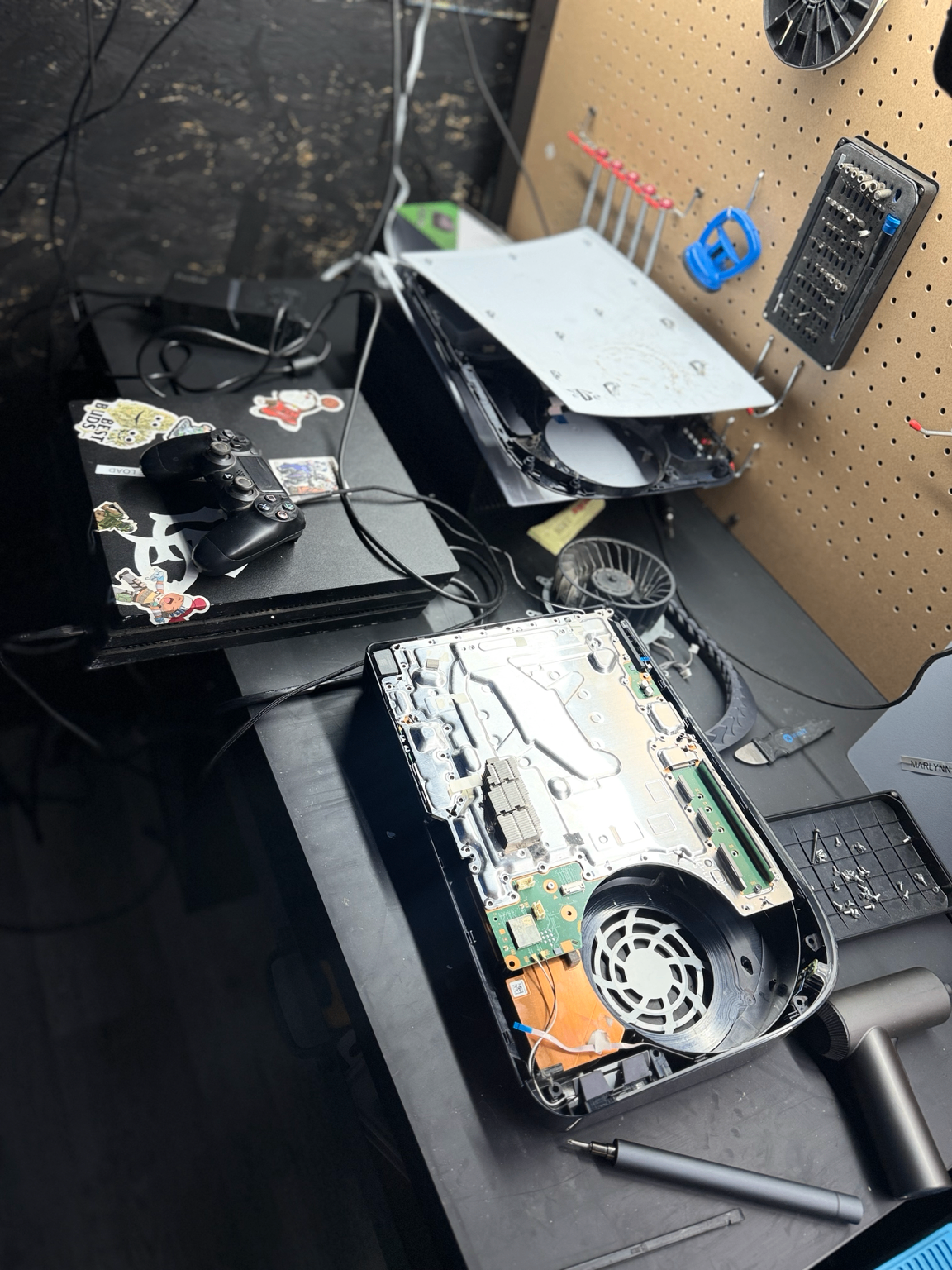
PS5 repair and internal cleaning at OneClick Phone Repairs in Fullerton CA
An opened PS5 on the bench at our Fullerton shop during an internal cleaning and thermal service.

Trained repair technicians

Including a certified advanced repair technician

Warranty varies by repair

Coverage confirmed with your quote

Same-day on many repairs

Depending on parts and device condition

No surprise pricing

Your exact price texted before we start

PS5 Repairs We Handle

Tap the issue that matches your console to jump to what we check and how we repair it.

PS5 HDMI Port Repair

No signal, flickering video, a loose cable or bent pins in the HDMI port.

Common Symptoms

  • No image or “no signal” on the TV even though the console powers on
  • Video cuts in and out, or only works when the cable is held at an angle
  • The HDMI cable feels loose or falls out on its own
  • Bent, missing or blackened pins visible inside the port
  • The whole port has been pushed back into the console

How It Happens

  • The cable getting bumped or stepped on while it is plugged in
  • Moving or standing the console up with the cable still connected
  • Years of plugging and unplugging putting strain on the port's solder joints
  • A drop or knock that transfers force straight into the port

What We Inspect

  • Test the console with a known-good cable and a known-good display first
  • Inspect the port and the pads around it under a microscope
  • Check for damage that reaches past the port into nearby board circuitry
  • Confirm whether the fault is the port itself or a deeper video-path problem

How We Repair It

Physical HDMI-port damage is a board-level micro-soldering repair — the damaged port is removed, the pads are cleaned and prepared, and a new port is fitted.

If diagnosis points past the port to a wider board fault, we tell you what we found and what the realistic options are before any further work.

Video output is retested on a 4K display before the console goes back to you.

PS5 Overheating Repair

Full thermal service — deep cleaning, airflow, fan check and Liquid Metal as needed.

Common Symptoms

  • The console shuts down mid-game or throws a temperature warning
  • The fan gets very loud, or ramps up and down constantly
  • Hot air coming from the rear vents with games stuttering or crashing
  • Games freeze after a set amount of play time rather than at random

How It Happens

  • Dust and pet hair packed into the fan, heatsink fins and power-supply intake
  • The console sitting in an enclosed cabinet or against a wall with no airflow
  • A worn or failing fan that no longer moves enough air
  • Liquid Metal that has shifted or thinned out so heat no longer transfers properly

What We Inspect

  • Open and inspect the fan, heatsink, shielding and power-supply airflow paths
  • Look for pest debris, liquid residue or corrosion while the console is apart
  • Check fan behaviour and bearing noise under load
  • Inspect Liquid Metal coverage and containment around the APU

How We Repair It

A dust cleaning on its own is not the fix. Our PS5 overheating service is a complete thermal service: full teardown, deep cleaning of the fan, heatsink and power-supply airflow, fan inspection and replacement when it is worn, and inspection of the Liquid Metal.

Liquid Metal is serviced or replaced when contact has degraded, then the console is reassembled with the shielding and containment set correctly.

The console is stress tested afterwards so we can see temperatures and fan behaviour hold up before you pick it up.

PS5 Deep Cleaning + Liquid Metal Service

Preventative teardown clean, fan and airflow service, Liquid Metal inspection.

Common Symptoms

  • The console has never been opened or cleaned since you bought it
  • It runs hotter and louder than it used to
  • You want maintenance before a problem starts

How It Happens

  • Normal dust build-up over years of use
  • Carpet, pets or smoke in the room the console lives in
  • Thermal material that naturally degrades over time

What We Inspect

  • Inspect every airflow path, not just the visible vents
  • Check the fan, heatsink and power-supply intake for build-up
  • Inspect Liquid Metal coverage and containment
  • Note any corrosion, pest debris or prior repair work found inside

How We Repair It

Full teardown, deep cleaning of the fan, heatsink, shielding and power-supply airflow, then reassembly and testing.

Liquid Metal is inspected and serviced or replaced as needed rather than assumed to be fine.

If we find damage that a cleaning cannot fix, we stop and explain it before doing more.

PS5 Roach / Pest Contamination Cleaning

Deeper contamination cleaning for consoles with insect debris, residue or odor.

Common Symptoms

  • Insects or insect debris visible through the vents
  • A persistent odor from the console when it warms up
  • Overheating or random shutdowns with no obvious dust problem
  • The console stopped powering on with no drop or liquid involved

How It Happens

  • Insects are drawn to the steady warmth and dark interior of a running console
  • Debris, droppings and residue build up on boards, fans and the power supply
  • That contamination blocks airflow and can hold moisture against components
  • Residue between contacts can cause shorts and long-term corrosion

What We Inspect

  • Full teardown with inspection of the board, power supply and every shield
  • Look for corrosion, residue tracks and heat damage under the contamination
  • Test the power supply and the console's ability to start reliably once clean
  • Document anything that needs repair beyond cleaning

How We Repair It

This is a deeper contamination cleaning than routine maintenance: complete disassembly, cleaning of the board and every component surface, the power supply, fan and heatsink, then reassembly with fresh thermal material as required.

Contamination can hide real damage. If the board or the power supply is affected, additional repair or replacement may be needed and we quote that separately after diagnosis.

Because contamination and corrosion can keep progressing, we are upfront about what cleaning can and cannot guarantee before you approve the work.

PS5 Power Supply Replacement

No power, clicks off, or shuts down under load — power-supply testing and replacement.

Common Symptoms

  • No power at all — no light, no fan spin
  • The console clicks and then powers straight off
  • It shuts down as soon as a demanding game loads
  • Startup is intermittent — sometimes it boots, sometimes nothing

How It Happens

  • Long-term heat stress on power-supply components
  • Dust or pest contamination inside the power supply itself
  • A surge or unstable power at the outlet
  • Age and normal component wear

What We Inspect

  • Confirm the outlet and power cable before touching the console
  • Test the power supply's behaviour on its own and under load
  • Inspect the power supply for burn marks, swollen components and contamination
  • Check the board side so we do not replace a power supply for a board fault

How We Repair It

When testing confirms the power supply, we replace it and retest the console under load.

If the fault is on the board instead, we say so — replacing a power supply that was never the problem is not a repair.

Contamination or heat damage found alongside the failure is cleaned and addressed at the same time.

PS5 No Power Repair

Dead console, no light, no fan — diagnosed before anything is replaced.

Common Symptoms

  • Nothing happens when you press the power button
  • A single beep or click, then silence
  • The light flashes briefly and goes out
  • The console powers on but never reaches the menu

How It Happens

  • Power-supply failure
  • A short caused by liquid, corrosion or pest contamination
  • Board-level component damage
  • Storage or internal connection faults

What We Inspect

  • Power path testing from the wall through to the board
  • Visual and microscope inspection for shorts, corrosion and damage
  • Component-level measurement to find where the power path stops
  • Check for signs of previous repair attempts

How We Repair It

No-power consoles start with advanced diagnostics because the cause is not visible from the outside.

Once we know what failed, we explain the repair, the realistic outcome and the cost before starting.

Board-level work is done in-house with micro-soldering equipment where the fault is repairable.

PS5 USB / USB-C Port Repair

Controllers won't charge, headsets cut out, or a port is loose or pushed in.

Common Symptoms

  • Controllers do not charge from the console
  • A USB device is not recognised in one port but works in another
  • The port feels loose, wobbly or pushed inward
  • Headsets or drives disconnect when the cable is nudged

How It Happens

  • Cables being pulled sideways or tripped over while connected
  • Repeated plugging and unplugging loosening the port's solder joints
  • Debris packed into the port
  • A cable left plugged in when the console was moved

What We Inspect

  • Test each port with known-good cables and devices
  • Inspect the port and the pads underneath it under a microscope
  • Check for damage in the surrounding circuitry, not just the connector

How We Repair It

Damaged front or rear ports are replaced at board level, then every port is retested with a controller and a drive.

If the connector is fine and the fault sits behind it, we diagnose the circuit rather than swapping parts.

PS5 Fan Replacement / Fan Noise

Grinding, rattling, whining or a fan that never slows down.

Common Symptoms

  • Grinding, rattling or clicking from inside the console
  • A high-pitched whine that gets louder over time
  • The fan runs at full speed even at the home menu
  • Noise plus heat warnings or shutdowns

How It Happens

  • Dust and hair wrapped around the fan blades and bearing
  • Bearing wear after years of running hours
  • A cable or shield touching the blade after a previous repair
  • Heat forcing the fan to run harder than it should

What We Inspect

  • Listen to and inspect the fan with the console apart
  • Check for obstructions, debris and blade damage
  • Confirm whether the noise is the fan or the disc drive
  • Check temperatures, because a healthy fan running flat out points to a thermal problem

How We Repair It

Cleaning fixes some fan noise; a worn bearing does not clean out, so the fan is replaced.

Because fan noise and overheating usually travel together, we inspect airflow and Liquid Metal at the same time.

PS5 Disc Drive / Disc Reading Issues

Discs won't load, get stuck, are ejected right away, or the drive grinds.

Common Symptoms

  • The console does not read discs, or only reads some of them
  • A disc is stuck inside and will not eject
  • The disc is ejected immediately after it goes in
  • Grinding or repeated clicking when a disc loads

How It Happens

  • A disc being pushed in at an angle or forced
  • The console being moved with a disc inside
  • Laser and mechanism wear over time
  • Dust and debris in the loading mechanism

What We Inspect

  • Test several discs, including a game and a movie disc
  • Inspect the loading mechanism, gears and belt
  • Check the laser assembly and its ribbon connections
  • Look for a foreign object or a second disc inside

How We Repair It

Stuck discs are removed without damaging the console or the game.

Depending on what we find, the repair may be a mechanical service, a laser or drive assembly repair, or a board-level fix — we confirm which after diagnosis.

PS5 Blue Light / White Light / Startup Issues

Blinking lights, boot loops, safe-mode loops and consoles stuck before the menu.

Common Symptoms

  • A blinking blue or white light that never settles
  • The console restarts before reaching the home screen
  • It boots into safe mode over and over
  • An error code appears on startup

How It Happens

  • Storage or system-software faults
  • Overheating protection cutting the console off during boot
  • Power delivery problems on the board
  • Damage from liquid, contamination or an earlier repair

What We Inspect

  • Read any error codes and test the console's behaviour cold and warm
  • Check storage and internal connections
  • Measure the power rails on the board
  • Inspect for heat damage, corrosion and contamination

How We Repair It

Startup faults get diagnosed before anything is replaced, because the same symptom has very different causes.

We explain what we found, whether it is repairable, and what the repair involves before you approve it.

PS5 Diagnostics / Advanced Board-Level Repair

Micro-soldering and component-level repair for faults that are not a simple part swap.

Common Symptoms

  • The console has already had parts replaced and still fails
  • No power, no video or shutdowns with no clear cause
  • Damage from liquid, contamination or a previous repair attempt
  • Another shop said it was not repairable

How It Happens

  • Component failure on the mainboard
  • Shorted lines from liquid or contamination
  • Physical damage to pads and traces around a connector
  • Heat stress over years of use

What We Inspect

  • Microscope inspection of the board
  • Component-level measurement along the failing power or video path
  • Thermal and load testing to reproduce the fault
  • An honest call on whether the repair is worth doing

How We Repair It

Board-level work is done in-house with micro-soldering equipment: component replacement, pad and trace repair, and connector-level rework.

Advanced diagnostics come first, and we tell you the outcome before spending your money on a repair that may not be viable.

Other PS5 Repairs

Controllers, storage upgrades, stand and cosmetic damage, and anything not listed.

Common Symptoms

  • DualSense drift, sticky buttons or charging problems
  • Storage upgrades and storage that is no longer detected
  • Cracked side panels or damaged stand mounts
  • Something odd that does not match any list

How It Happens

  • Everyday wear and accidents
  • Modifications or upgrades that did not go to plan
  • Faults that only show up in specific games or setups

What We Inspect

  • Reproduce the problem before deciding what to repair
  • Inspect anything that has been opened or modified previously
  • Confirm whether the fault is the console, the controller or the setup around it

How We Repair It

Tell us what is happening and a technician diagnoses it rather than guessing.

You get the findings and the price before any work begins.

Why Bring Your PS5 to OneClick

Board-Level & Micro-Soldering

HDMI ports, connectors, pad and trace repair and component-level work are done in-house with microscope and micro-soldering equipment.

Diagnosis Before Parts

Diagnostics are charged when the issue is unknown or needs testing. The approved diagnostic fee applies toward the repair when the repair begins within 5 days of issue confirmation.

Trained Technicians

Trained repair technicians, including a certified advanced repair technician.

A Real Fullerton Shop

One shop, one bench at 137 W Chapman Ave Suite B, Fullerton, CA 92832. Drop-offs and pickups happen here — we do not make mobile service calls.

Warranty Confirmed With Your Quote

Warranty varies by repair and part quality and is confirmed with your quote.

Tested Before Pickup

Consoles are reassembled and retested — video output, ports, fan behaviour and temperatures under load — before you collect them.

Warranty varies by repair and part quality and is confirmed with your quote. See the full warranty policy.

Related Repairs

A Short Drive From Fullerton and North Orange County

One shop, one bench in Fullerton. This is an in-shop repair service — we do not offer mobile or mail-in repairs. Most customers are about 10 minutes away. Many common repairs can be completed the same day when parts are available; call ahead to confirm.

  • Fullerton, CA

    Our shop — walk in on W Chapman Ave

  • Anaheim, CA

    About 10 minutes from central Anaheim

  • Buena Park, CA

    About 10 minutes down Beach Blvd

  • Brea, CA

    About 10 minutes south on Harbor Blvd

  • La Habra, CA

    About 10 minutes east on Whittier Blvd

  • Yorba Linda, CA

    About 15 minutes west on Imperial Hwy

Not sure if we cover you? Call or text (714) 805-9745 and we'll tell you straight.

PS5 Repair Drop-Off in Fullerton

137 W Chapman Ave Suite B, Fullerton, CA 92832

Mon–Sat 9am–8pm · Sun 9am–6pm

We are a short drive for gamers in Anaheim, Brea, Placentia, La Habra, Buena Park, Orange, Yorba Linda and the surrounding Orange County communities.

PS5 Repair FAQ

How much does PS5 repair cost?

It depends on the fault, so we do not publish console prices. A technician diagnoses the console, builds your exact price in OneClick OS, and sends it to you by text and email before any work starts.

How long does PS5 HDMI port repair take?

HDMI port replacement is board-level micro-soldering. Turnaround depends on the queue, whether the damage reaches past the port, and testing time, so we give you a timeline after diagnosis rather than a blanket promise.

Why does my PS5 shut off while playing games?

Shutdowns under load are usually thermal. Dust in the fan and heatsink, blocked power-supply airflow, a worn fan or degraded Liquid Metal contact can all cause it, and a failing power supply can look identical. We inspect all of it before recommending a repair.

Does a PS5 overheating repair include Liquid Metal service?

Yes. Our PS5 overheating service is a full thermal service: teardown, deep cleaning of the fan, heatsink and power-supply airflow, fan inspection, inspection of the Liquid Metal with servicing or replacement as needed, reassembly and stress testing.

Can you fix a PS5 with no display?

In most cases yes. We first rule out the cable and TV, then inspect the HDMI port under a microscope. Physical port damage is repaired at board level, and if the fault sits deeper in the video path we tell you what we found before going further.

Can you clean a PS5 with roach or insect contamination?

Yes, and it is handled as a contamination cleaning rather than routine maintenance — full disassembly, cleaning of the board, power supply, fan and heatsink, then reassembly and testing. If the contamination has already damaged the board or power supply, that repair is quoted separately.

Can you repair PS5 motherboard problems?

Yes. Board-level micro-soldering is done in-house, including connector rework, pad and trace repair and component replacement. Advanced diagnostics come first so you know whether the repair is viable.

Do I need an appointment for PS5 repair?

Walk-ins are welcome at our Fullerton shop. Requesting an appointment or a quote online first means your details are already in the system when you arrive.

Ready to Get Your PS5 Fixed?

Book PS5 Repair